

TAG STORY · JOURNAL
Industry Notes: Data Centers
From CPUs, GPUs, and TPUs to HBM and NVLink: how an AI data center actually works.
TAG Story ·

Open an AI chat tool, type a question, and a few seconds later you have an answer. It looks like a simple exchange of text. Behind it, though, is a chain of physical events: data travels to a server, processors turn text into numbers, chips perform enormous amounts of math, memory keeps moving data, networks coordinate machines, and power and cooling systems keep the whole operation running.
People often say that AI needs computing power. But computing power has never been just a faster chip. It is an entire infrastructure that makes computation continuous, efficient, and reliable.
Think of a data center as a factory. Processors are the machines, memory is the material rack beside each machine, networks are the roads, electricity is the energy supply, and cooling controls the factory environment. If any part falls behind, even the most expensive machines cannot deliver their full output.
This article answers eight questions: What does a data center do? How do CPUs, GPUs, and TPUs differ? What is parallel computing? How does a GPU produce an AI answer? Why do HBM and NVLink matter? How does electricity limit expansion? How do data centers make money? And what are people in the industry actually asking?
01 | A Data Center Is More Than a Room That Stores Data
A data center is a physical facility that integrates servers, data storage, networking, power, cooling, monitoring, and security. It keeps websites, business systems, cloud platforms, and AI services operating around the clock.
Start with five parts:
System | Meaning | What does it do? |
|---|---|---|
Compute | Computing | CPUs, GPUs, and TPUs run programs and perform calculations |
Storage | Data storage | SSDs and HDDs hold data, model files, and backups |
Networking | Connectivity | Switches, routers, and fiber let equipment exchange data |
Power | Electricity supply | The grid, transformers, UPS systems, and other equipment provide reliable power |
Cooling | Heat removal | Air cooling, liquid cooling, and heat exchangers remove heat |
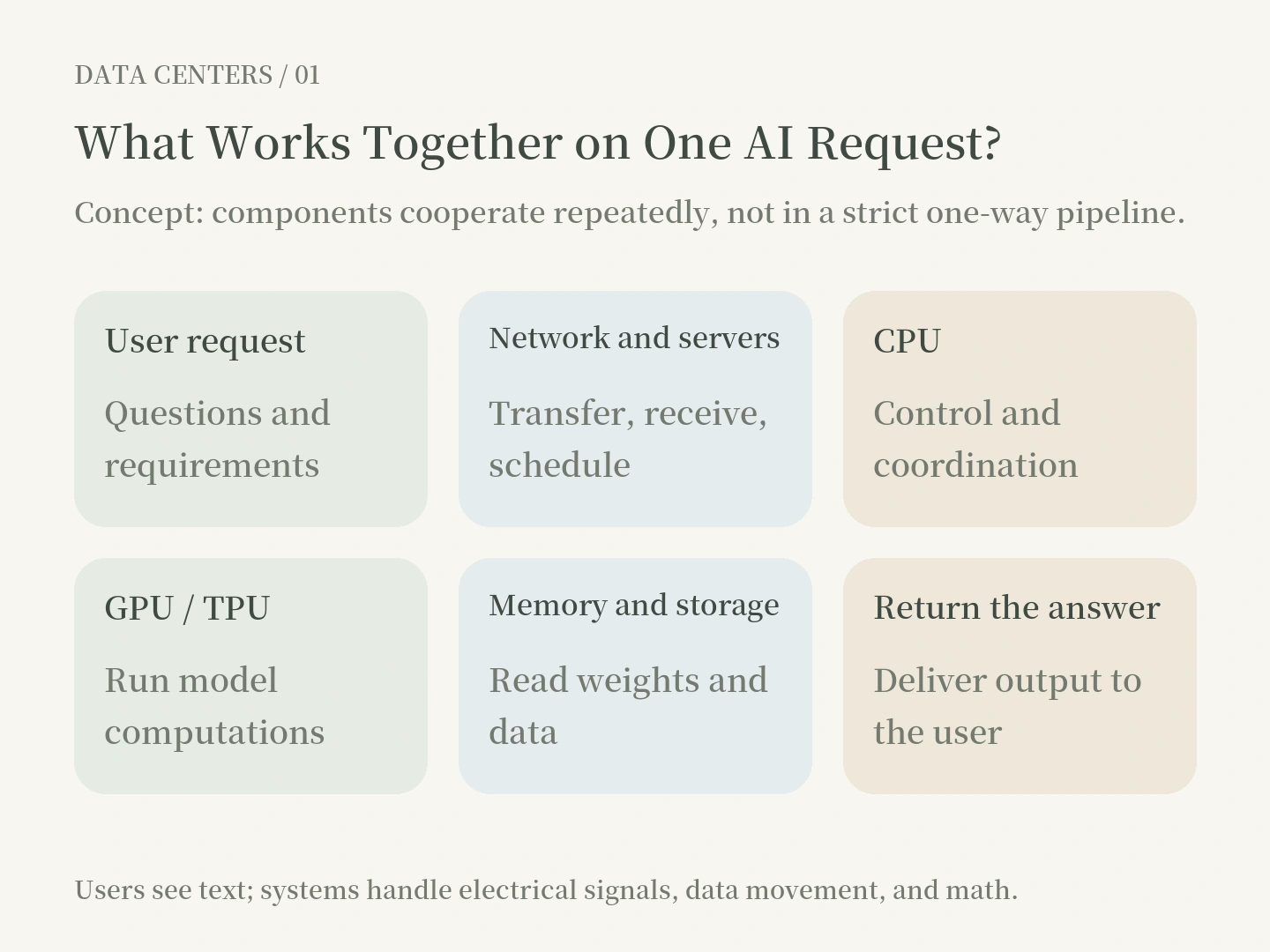
Take your experience using AI: your input reaches the service over the internet; a CPU or another general-purpose processor handles some control, scheduling, and data processing; a GPU or TPU runs the model's computations; memory supplies model parameters and intermediate data; and the result returns to your screen over the network.
Two commonly confused ideas need to be separated:A data center is a physical facility. Cloud computing is a service model that uses such facilities to provide computing and storage resources on demand. Renting a cloud server does not make the computer disappear. Someone else manages the underlying hardware and facility for you.
02 | CPUs, GPUs, and TPUs: Three Different Computing Roles
CPU: Good at Complex, Varied Work
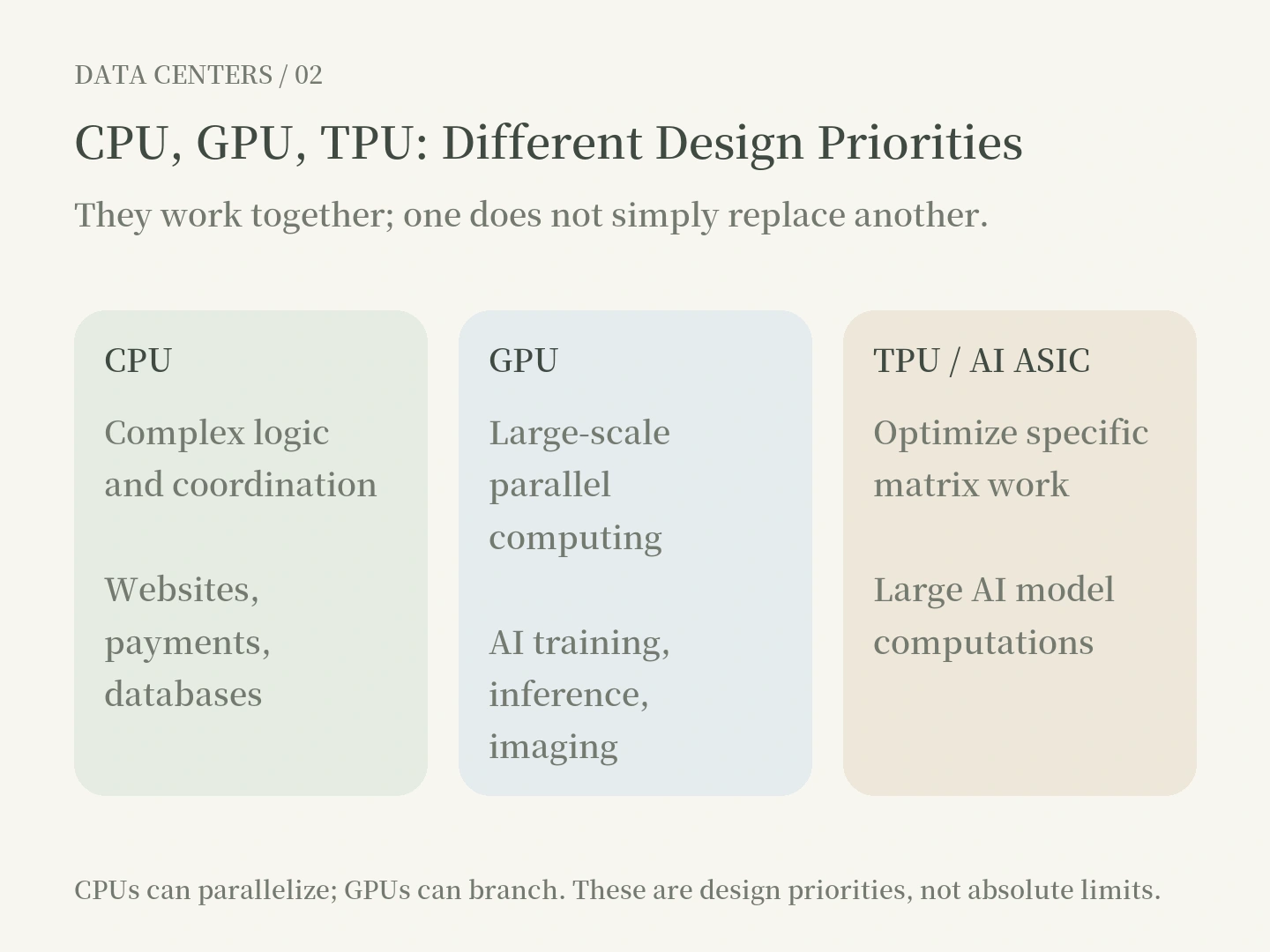
A CPU (central processing unit) is a general-purpose processor. Think of a professional manager who can handle many situations: verifying accounts, querying databases, evaluating payment results, assigning work, and dealing with exceptions.
A CPU can do more than one thing and may have many cores working simultaneously. Its design strengths typically include versatility, complex control flow, low latency for individual tasks, and support for diverse programs.
Where you see it: Website backends, payments, banking transaction systems, enterprise ERP, databases, server operating systems, and AI services' data preprocessing and job scheduling.
GPU: Good at Doing Large Amounts of Similar Math at Once
A GPU (graphics processing unit) originally developed around computer graphics. Today it is also an important accelerator for AI computing.
Suppose you have 10,000 photos that need similar brightness adjustments. Instead of having one worker process them one by one, you could distribute them among many workers at once. GPU hardware is especially suited to work that can be divided into many relatively independent pieces.
Modern AI GPUs also have features such as Tensor Cores that efficiently accelerate the matrix multiplication frequently used in deep learning.
Where you see it: AI model training and inference, image and video processing, 3D rendering, scientific simulation, and molecular research.
TPU: A Dedicated Accelerator Designed for AI
A TPU (tensor processing unit) is an AI accelerator chip designed by Google. It is a type of AI ASIC (application-specific integrated circuit).
ASIC means a chip designed for a particular application. If a GPU is a factory with a broad assortment of equipment, an AI ASIC is more like a production line designed around a specific process. For the matrix calculations common in deep learning, TPUs use architectures such as the MXU (matrix multiply unit) to improve performance and energy efficiency.
Where you see it: Large-model training and inference on Google Cloud, and machine learning work using supported tools such as JAX and PyTorch. Beyond Google's TPUs, AWS Trainium、Inferentia are examples of other companies' dedicated AI accelerators.
The key distinction: CPUs prioritize versatility, GPUs excel at large-scale parallel computation, and AI ASICs such as TPUs optimize further for particular AI workloads. They often work together; you do not necessarily choose just one. Which is most cost-effective also depends on software tools, model types, actual performance, procurement, and energy costs.
03 | What Is Parallel Computing—and What Makes a Task Parallel Enough?
Parallel computing means assigning separable work to multiple computing resources at the same time.
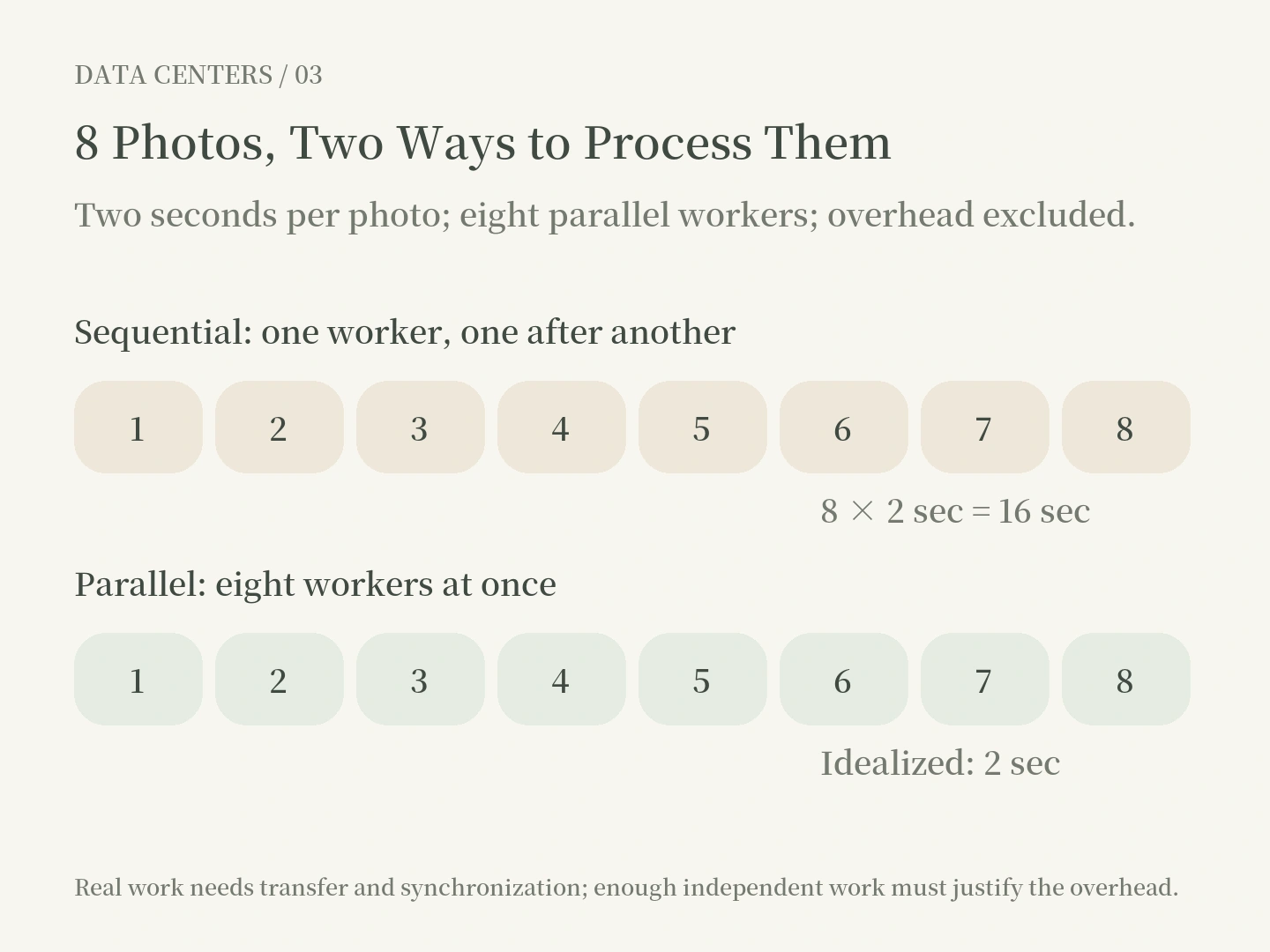
What really matters here is dependency. Eight photos can be color-adjusted independently without waiting for one another. Baking a cake is different: you need the batter before it goes into the oven, and you need the cake baked before decorating it. Even a hundred chefs cannot make certain steps happen simultaneously.
So having lots of cores does not guarantee speed. The work must actually be divisible, and dividing it must produce a net benefit.
What Makes Parallelism Sufficient?
There are two tests:
First, enough independent work. If you only need to add two very small numbers, arranging thousands of computing resources to use an entire GPU may be wasteful. With millions of pixels or large matrices, a GPU has more opportunity to help.
Second, the time saved must exceed the overhead. Sending work to a GPU can involve data transfer, kernel launches, coordination, and synchronization waits. If the work itself takes one millisecond but delegation and data movement take five, parallelizing it may not be worthwhile.
There is no fixed threshold of 100, 1,000, or 10,000 tasks. Enough is a threshold you must test with the actual workload.
04 | How Does a GPU Produce an AI Answer?
Many people imagine that AI answers a question by finding a ready-made passage in an enormous database. That is not the primary way a large language model works.
Take a common architecture, the Transformer. We can simplify the process into five steps.
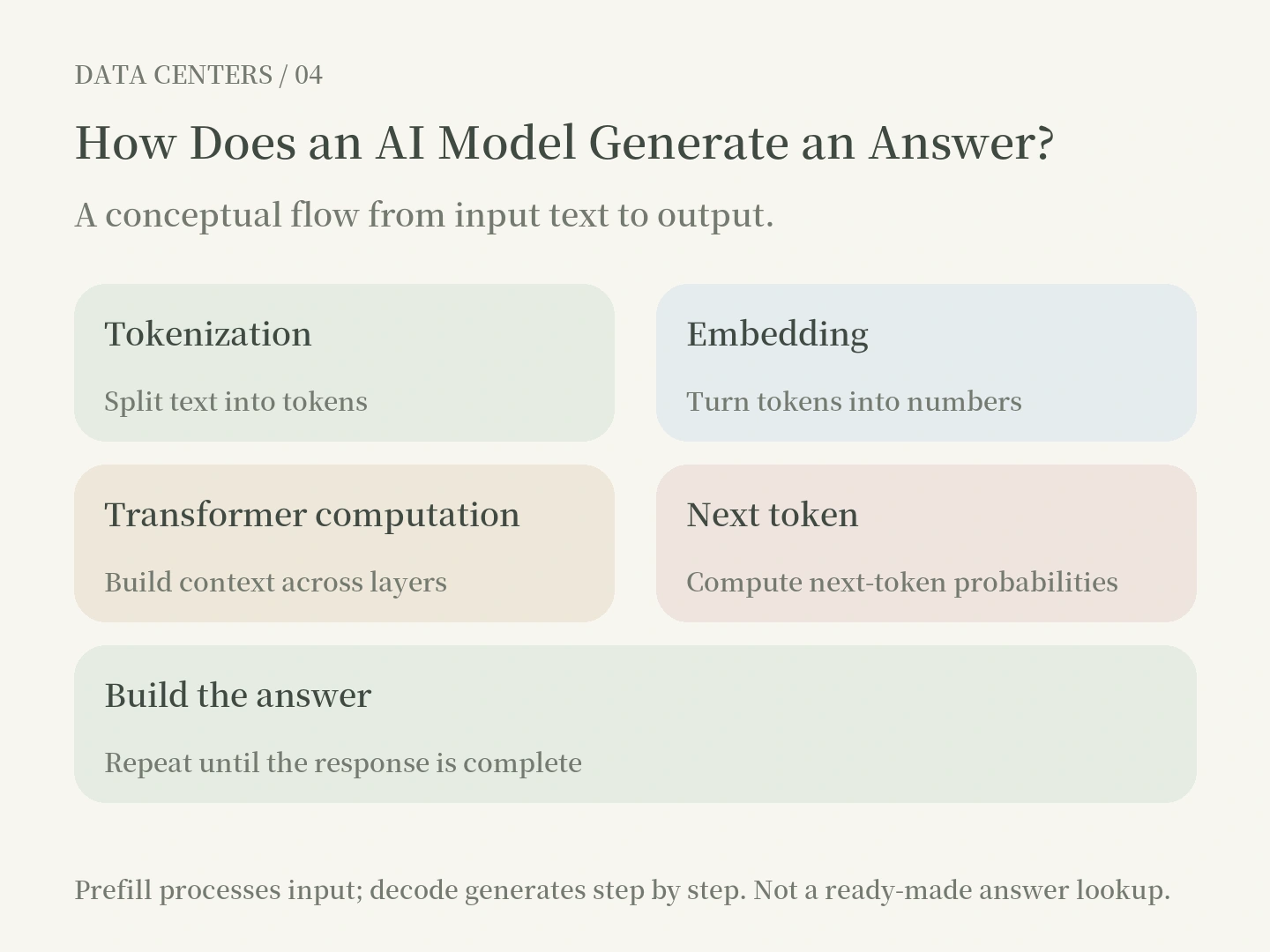
1. Tokenization: Split the input into tokens, each associated with a numerical ID. A token is not necessarily one Chinese character or one English word.
2. Embedding: Convert tokens into numerical vectors so the model can process language mathematically.
3. Matrix Multiplication and Attention: Large parameter matrices process numerical representations. Attention lets the model combine information from different positions in context. This is where GPUs and TPUs have particular advantages.
4. Next-Token Prediction: Compute scores and a probability distribution for the next token, then select it according to an output strategy.
5. Repeated Generation: In a typical autoregressive language model, each new token depends on what has already been generated. That is why answers generally emerge step by step, rather than being calculated in full all at once.
Prefill and Decode: One Model, Two Bottlenecks
Prefill processes a batch of input tokens. It often involves substantial parallelizable matrix computation and can approach a compute-bound workload.
Decode generates output tokens sequentially. At a low batch size, the system may repeatedly move model weights and cached data, making it more likely to be memory-bandwidth-bound.
This is not an absolute rule. Batch size, model architecture, context length, and software implementation all change the bottleneck. The same GPU can therefore perform very differently across AI workloads.
05 | HBM: Why Can a Powerful Chip Still Be Left Waiting?
HBM (high-bandwidth memory) is a fast memory technology commonly used in high-end AI accelerators. It gives the chip rapid access to model parameters, the KV cache, and intermediate data.
Two things must be kept separate: capacity and bandwidth.
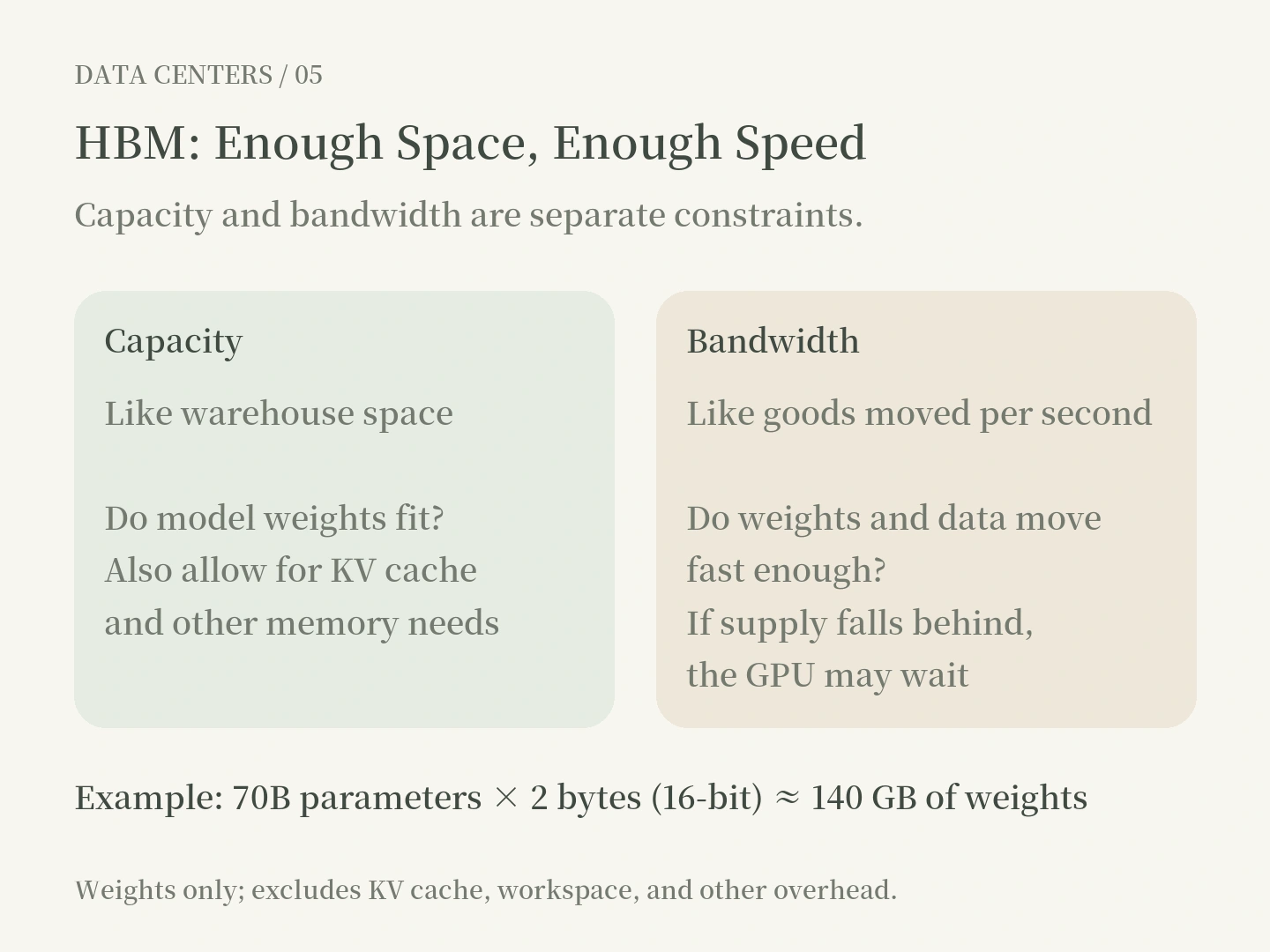
• Capacity: Will the model and required data fit? Commonly measured in GB.
• Bandwidth: How much data can be read or written each second? Commonly measured in GB/s or TB/s.
For example, a 70B (70-billion-parameter) dense model stored at 16 bits per parameter needs, for its weights alone:
70 billion × 2 bytes = approximately 140 GB.
At an idealized 8 bits, weights would need roughly 70 GB; at 4 bits, around 35 GB. These figures cover weights only, excluding quantization metadata, the KV cache, workspace, and other overhead. They also do not imply that reducing precision leaves model quality entirely unchanged.
The KV (key-value) cache stores attention information from earlier tokens during inference, so the model need not recompute the entire history for every new token. It reduces repeated computation but requires additional memory. More users and longer contexts generally increase that pressure.
That is why a GPU's advertised FLOPS (floating-point operations per second) are not enough. If memory cannot move data quickly enough, compute units may sit idle. This is the idea behind the Roofline Model in computer architecture: system performance is constrained by both peak compute capability and data movement.
06 | NVLink: Why Do GPUs Need Highways Between Them?
Larger models and heavier tasks are more likely to need several GPUs working together. But plugging several GPUs in does not automatically turn them into one giant GPU.
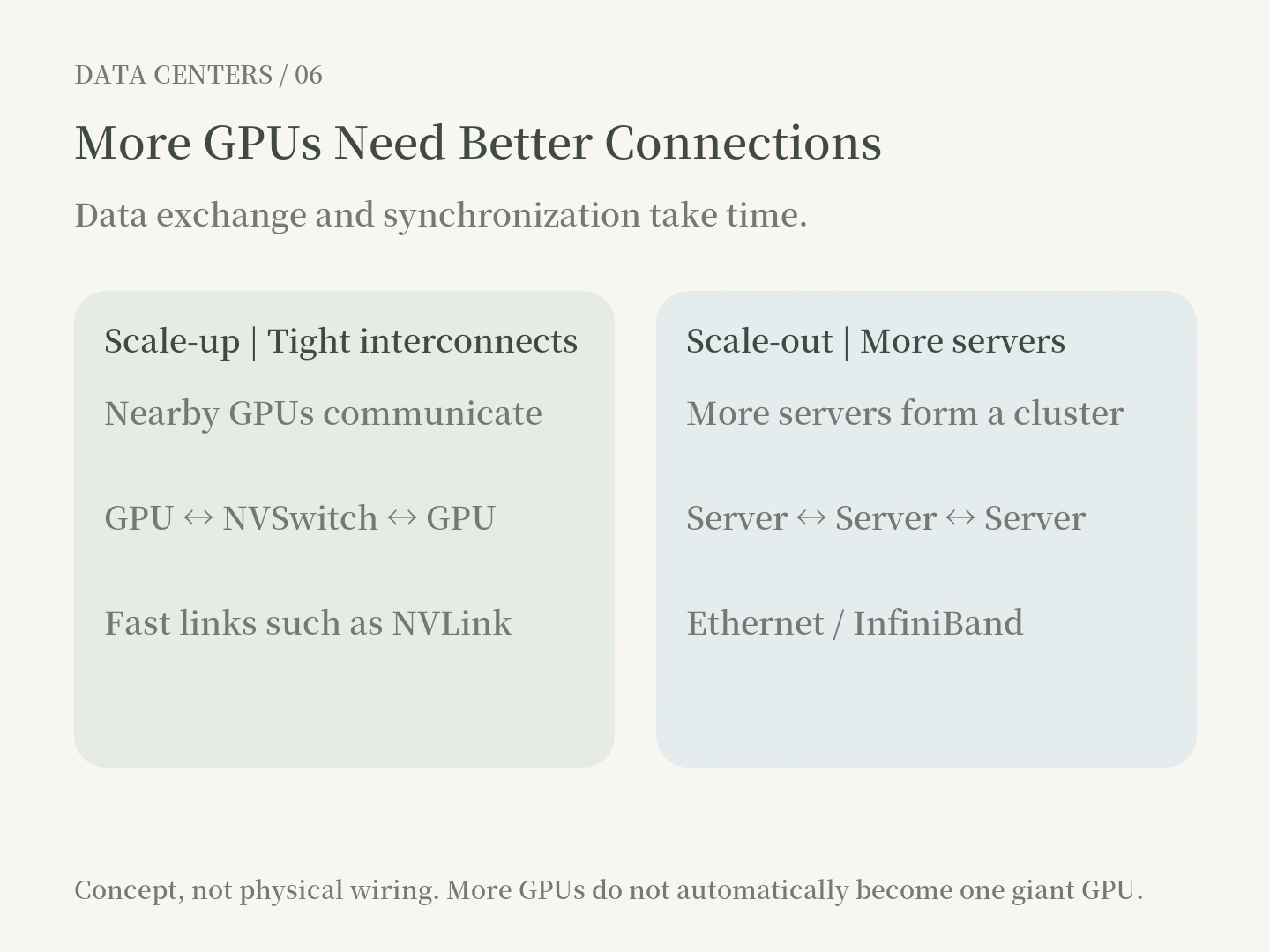
NVLink, NVIDIA's high-speed interconnect, lets GPUs exchange data quickly. NVSwitch, NVIDIA's high-speed switching chips and systems, helps create larger interconnected GPU domains. They primarily address data transfer when GPUs work together.
Suppose an AI model is split into four parts across four GPUs. Intermediate results calculated by GPU A may need to reach GPUs B, C, and D. If computation takes two milliseconds but exchanging data takes five, communication will hold the system back however fast its GPUs are.
This involves techniques such as tensor parallelism, AllReduce and AllGather.
The industry often distinguishes:
• Scale-up: Let a group of accelerators work together at high speed and low latency. NVLink and NVSwitch are common approaches.
• Scale-out: Connect more servers or racks into a computing cluster, often using Ethernet or InfiniBand.
NVIDIA's fifth-generation NVLink, introduced with Blackwell in 2024, has an officially specified aggregate bidirectional bandwidth per GPU of 1.8 TB/s. That specification belongs to a particular product generation. It does not describe every NVLink system or guarantee the effective throughput an application will achieve.
One common mistake is to imagine eight GPUs, each with 80 GB of HBM, as a single 640 GB chip with uniform access speeds. In practice, data partitioning, which GPU holds the data, cross-device access latency, and software support all matter.
07 | Power and Cooling: As Chips Get Stronger, Data Centers Look More Like Heavy Industry
Accelerators need electricity, and most of the energy they consume ultimately becomes heat. Higher computing density means greater challenges in distributing power and removing heat.
Data centers discuss three issues: power availability, rack power density, and cooling capacity. Being able to buy chips does not mean the grid can supply power on time. Having room in the rack does not mean cooling can carry away the heat.
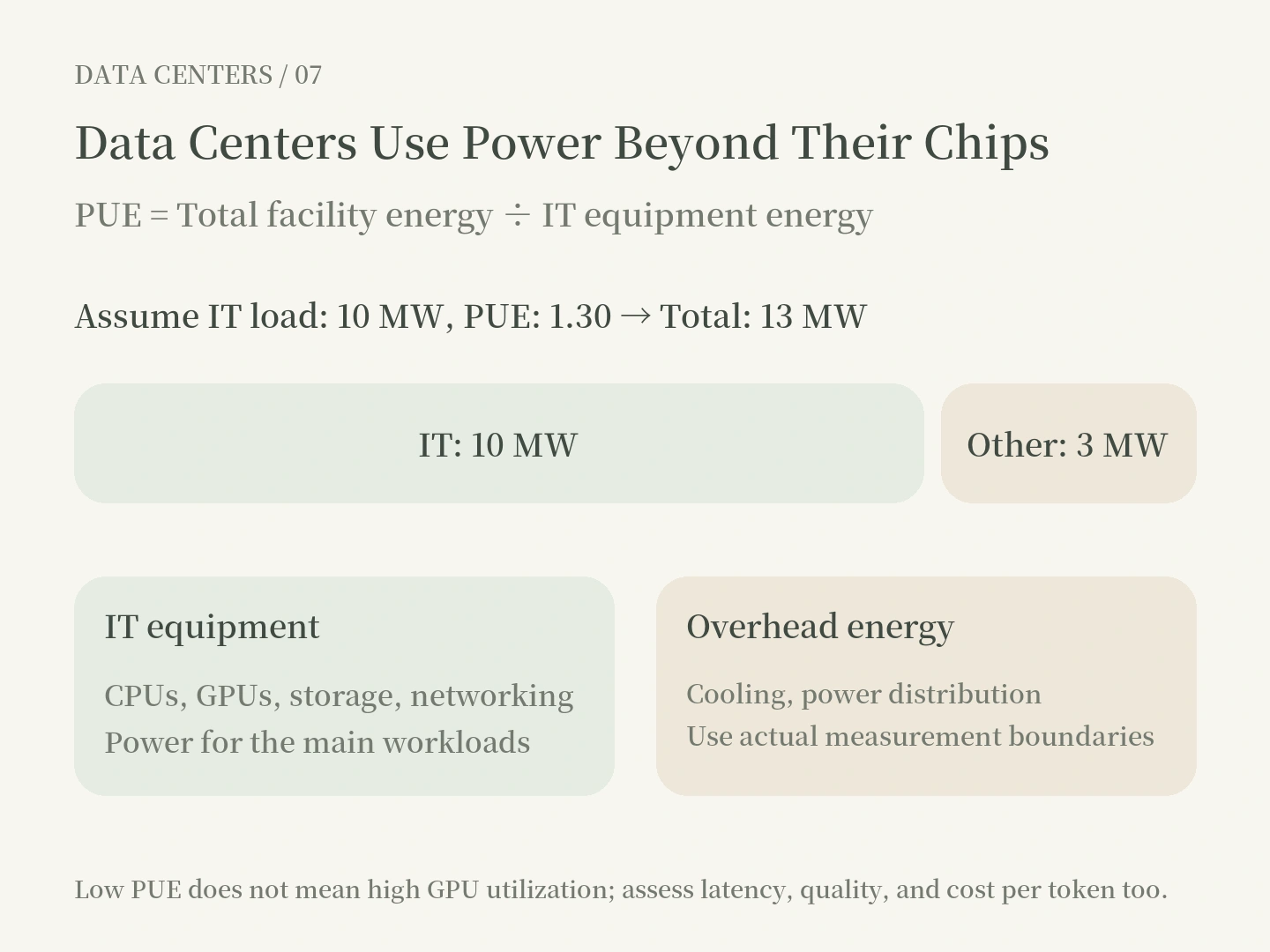
PUE (power usage effectiveness) is calculated as:
PUE = Total facility energy ÷ IT equipment energy.
If IT equipment consumes 10 MW and PUE is 1.30, the facility as a whole consumes 13 MW, of which roughly 3 MW goes to non-IT facility loads. A PUE closer to 1 generally means a smaller proportion of overhead. But PUE does not tell you whether GPUs are being used productively, nor does it establish a low cost per AI token.
A dated set of figures helps put this in perspective:Google reported an average PUE of 1.09 for its large global data centers in 2025. Uptime Institute's 2026 Global Data Center Survey put the average for surveyed facilities at about 1.52. These groups differ in facility mix, methodology, and sample. They are not a like-for-like efficiency contest.
Energy demand is also growing. In 2025, the IEA (International Energy Agency) estimated that data centers worldwide used approximately 415 TWh in 2024. Its base case projected about 945 TWh in 2030. The latter is a forecast, not something that has already happened.
Power is about more than price. It also involves the energization date, redundancy, grid stability, contracted capacity, and fault response. What can actually sell computing power is a system that keeps running, not an equipment shopping list.
08 | Why Can't AI Scale Just by Adding GPUs?
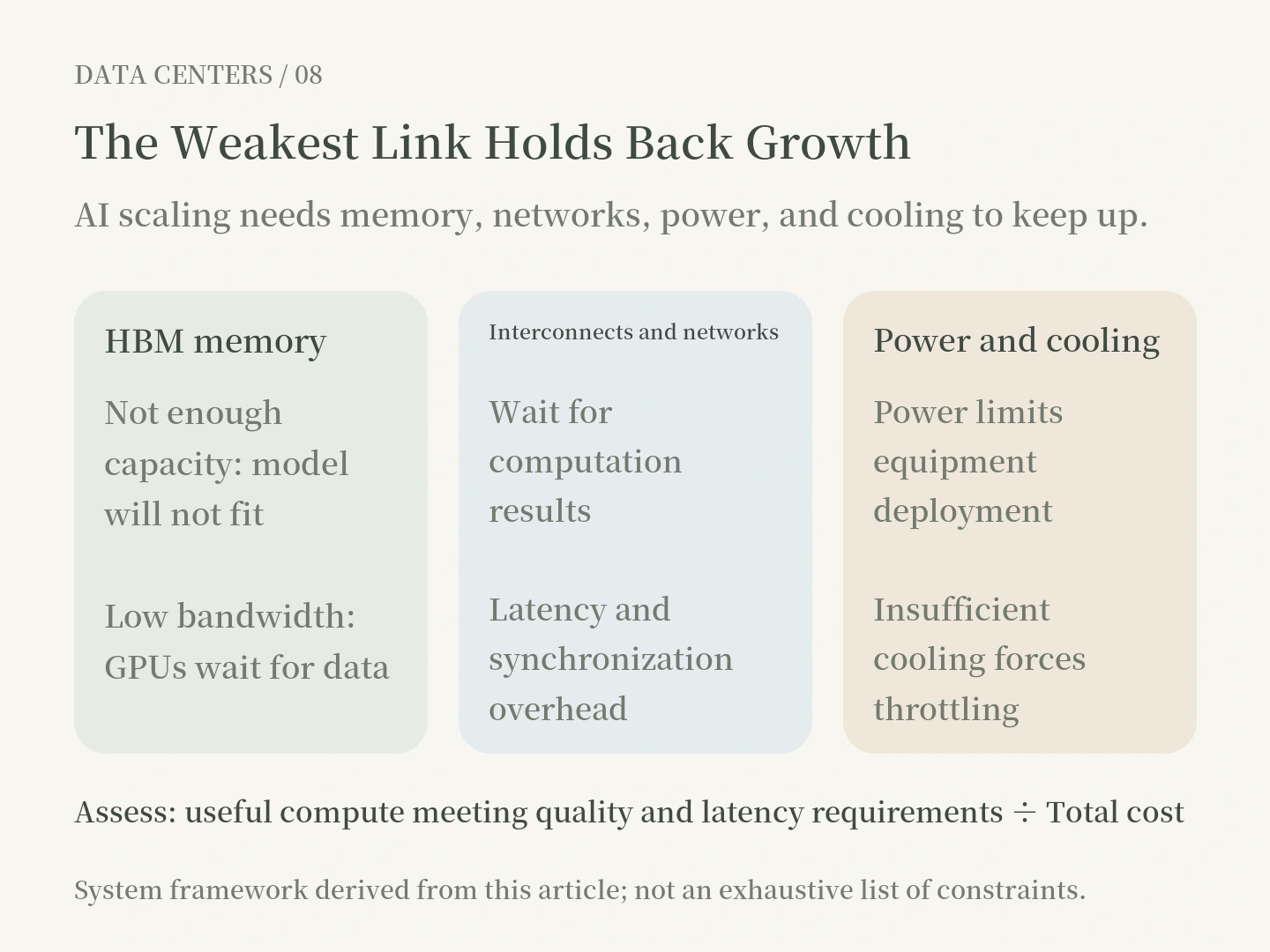
Imagine a factory buying eight new machines while retaining one freight road, its original power supply, and the same warehouse. Theoretical capacity may increase eightfold; actual output will not automatically follow.
AI systems work the same way. A model may exceed HBM capacity. Insufficient memory bandwidth leaves GPUs waiting. Multi-GPU work adds networking and synchronization overhead. Without power and liquid cooling in place, machines cannot run at full load. Software scheduling, memory management, and user demand also limit useful output.
Suppose a task takes 80 seconds on one GPU and 14 seconds on eight GPUs:
Speedup = 80 ÷ 14 ≈ 5.71×; parallel scaling efficiency = 5.71 ÷ 8 ≈ 71.4%.
This is not a benchmark for any specific GPU. It is a worked example of scaling efficiency. You also need to establish whether the comparison holds total work constant (strong scaling) or increases the workload with the number of machines (weak scaling). Otherwise the numbers may not be comparable.
In model inference, distinguish:
• Latency: How long does an individual user wait?
• Throughput: How much work, or how many tokens, can the whole system produce per second?
• TTFT (time to first token): How long before the user sees the first token?
• TPOT (time per output token): The average interval between subsequent output tokens.
• Goodput: Output that is actually deliverable within quality requirements and service-level agreements (SLAs).
For example, increasing batch size may raise aggregate token throughput while lengthening some users' waits. Before measuring speed, ask: fast for whom, and under what conditions?
09 | What Kind of Business Is a Data Center?
There are at least three business models.
Model | What does the customer buy? | Representative provider type |
|---|---|---|
Colocation | Facility space, power, cooling, and physical connectivity | Specialist data center operators |
Cloud / IaaS | Computing, storage, and networking resources rented on demand | Large public cloud providers |
GPU cloud | GPU resources for AI training and inference | Specialist GPU cloud providers |
The three can work together; they are not mutually exclusive. Some companies own data centers, some rent facilities and sell compute, and some sell complete AI model services on their own hardware.
From a business perspective, counting GPUs is not enough. You also need to consider usable power, billable utilization, customer contracts, hardware depreciation, financing, networking costs, electricity prices, maintenance and failure risks, and revenue per unit of useful compute.
A useful question is: If two companies each own a thousand GPUs, why might their profits be completely different? Identical equipment does not guarantee identical demand or commercial efficiency. Long-term contracts and spot demand produce different revenue stability. High utilization does not necessarily mean high gross margins; pricing, energy, and capital costs still matter.
For investors and business decision-makers, what deserves comparison is the total cost and profitability of a unit of useful computation at the same standards of reliability, quality, and latency.
10 | What Should You Ask People in the Data Center Industry?
Do not start with “How many GPUs do you have?” That only establishes equipment scale. It is more useful to clarify the system's constraints and evidence.
Question 1: When you say 100 MW of capacity, what capacity do you mean? Power under application, contracted capacity, energized capacity, or power actually available to IT equipment? When can it enter service?
Question 2: What is the main bottleneck for this AI workload? GPU compute, HBM capacity, HBM bandwidth, GPU interconnects, or cooling? What monitoring data can you provide?
Question 3: How does scaling efficiency change as you add GPUs? Going from eight to sixty-four GPUs, how much faster does a single task run? Does communication wait time increase?
Question 4: Are you optimizing latency or throughput? For LLM inference, does the benchmark specify the model, batch size, input and output lengths, TTFT, TPOT, and concurrency?
Question 5: What does high utilization mean? GPU activity, useful computation, capacity sold, or billable usage? These are different numbers.
Question 6: Are power, cooling, and networking matched? How many kW does a high-density rack require? What redundancy exists if something fails? Could a shared single point of failure take an entire group of machines offline?
Question 7: What is the full TCO (total cost of ownership) under real customer demand? Does it include depreciation, financing, electricity, networking, maintenance, cybersecurity, and replacement cycles?
A mature technical discussion is not a contest over who knows more acronyms. It explains the conditions, measurement methods, actual bottlenecks, costs of improvement, and business results.
Conclusion | The Future of Computing Is a Competition Between Entire Systems
Data centers may look like a technology business, but they bring together semiconductors, energy, construction, software, networking, capital, and operations.
CPUs, GPUs, and TPUs determine how computation happens. Parallel computing determines how work is divided. HBM determines whether data fits and moves fast enough. NVLink and other networks determine how chips cooperate. Power and cooling determine whether the entire factory can actually run.
So the question in AI scaling should go beyond “How much faster will the next GPU be?” We should ask:At the same quality, latency, and reliability requirements, can the entire system continuously deliver more useful computing power at a lower total cost?
Understand that question and you can move beyond chip specification sheets, grasp the engineering of data centers, and assess the AI infrastructure industry over the next twenty years with better judgment.
Quick Glossary
Term | Expanded name / meaning | In one sentence |
|---|---|---|
Data Center | Data center | A physical facility that provides computing, storage, networking, and reliable operation |
CPU | Central processing unit | Versatile; suited to control and varied logical tasks |
GPU | Graphics processing unit | Suited to large amounts of parallelizable math |
TPU | Tensor processing unit | Google's dedicated accelerator for AI workloads |
AI ASIC | AI application-specific integrated circuit | A chip highly customized for AI computation |
Parallel Computing | Parallel computing | Execute separable portions of work simultaneously |
Transformer | Transformer model | A common deep learning architecture |
Training / Inference | Training / inference | Learn model parameters / use the model to produce results |
HBM | High-bandwidth memory | Rapidly supplies model weights and intermediate data |
KV Cache | Key-value cache | Stores attention information from previous tokens |
NVLink | NVIDIA high-speed interconnect | Enables fast data exchange between GPUs |
Scale-up / Scale-out | Tightly coupled / cross-node expansion | Connect nearby accelerators or more servers |
PUE | Power usage effectiveness | Ratio of total facility energy to IT equipment energy |
FLOPS | Floating-point operations per second | A unit measuring the rate of computation |
Latency / Throughput | Latency / throughput | Wait per request / work processed per unit of time |
TCO | Total cost of ownership | Count equipment, energy, maintenance, depreciation, and other costs together |